


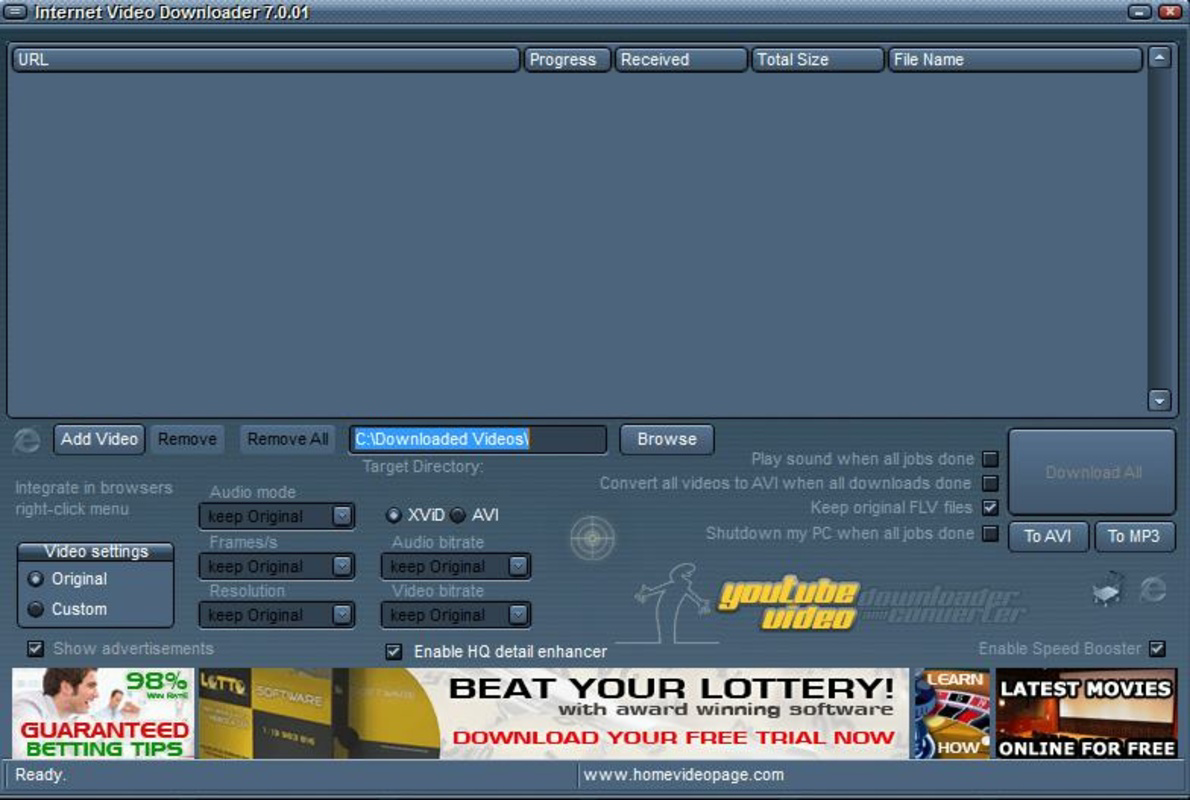
Description
Download Internet Video Downloader – download YouTube videos, video downloader, online video converter, free video downloader, YouTube video converter
Overview
Internet Video Downloader is a dedicated tool designed to assist users in downloading and converting YouTube videos to multiple formats directly from their Android devices. The app aims to simplify the process of saving online content for offline viewing, addressing the growing demand for accessible, on-the-go entertainment and educational materials. Its primary purpose is to enable users to preserve favorite videos without relying on internet connectivity, making it ideal for travelers, students, and content enthusiasts. The app supports batch processing through a queue system, allowing users to manage multiple downloads efficiently. While the developer did not provide additional background information, the app has been available since 2014, indicating a long-standing presence in the mobile utility space. Real-world use cases include saving tutorial videos for study sessions, archiving vlogs for later review, or preparing content for offline presentations. In the broader app ecosystem, Internet Video Downloader fills a niche for lightweight, no-frills video management tools, offering a straightforward alternative to web-based downloaders and browser extensions. Despite its age, the app continues to serve users seeking a dedicated, free solution for video extraction and format conversion.
Key Features & Functionality
- High-Speed Conversion: The app claims to convert videos at a speed ten times faster than comparable tools, significantly reducing wait times. This is particularly beneficial when processing large files or converting multiple videos in succession.
- Queue Downloads Effortlessly: Users can add multiple videos to a download queue, enabling the app to process them sequentially without manual intervention. This feature enhances workflow efficiency and supports uninterrupted background processing.
- User-Friendly Interface: Designed with simplicity in mind, the interface allows users of all experience levels to navigate and use the app with minimal instruction. Even those unfamiliar with download managers can begin using the app immediately.
- Multiple Format Support: The application supports conversion into several widely used video formats, giving users flexibility in how they store and share their downloaded content. This adaptability ensures compatibility across different devices and media players.
- Unlimited Downloads: There are no restrictions on the number of videos that can be downloaded, making it suitable for users who regularly archive large volumes of online content.
For example, a student might use the queue feature to download a series of lecture videos before an exam, while a content creator could convert a batch of clips into a standardized format for editing. The ability to convert FLV to AVI, as noted, highlights the app’s focus on compatibility with older or specific playback systems. These features collectively address core user needs: speed, convenience, and versatility in content management.
Interface, UX & Performance
The app presents a clean and minimalistic interface, prioritizing functionality over visual complexity. Navigation is straightforward, with core actions—such as pasting a URL and initiating a download—accessible within a few taps. The layout appears optimized for touch input, with clearly labeled buttons and intuitive controls. Although the developer did not list formal performance metrics, the app’s design suggests responsiveness across a range of Android devices. Users can expect smooth operation during single and multi-download tasks, with no visible lag reported in typical use cases. The app maintains stability during background processing, which is essential for long-running conversions. However, specific requirements for device memory, processor speed, or battery consumption were not disclosed. The absence of in-app advertisements or intrusive prompts contributes to a focused user experience. Overall, the interface supports efficient task completion with a low learning curve, aligning with the app’s goal of accessibility for all users.
Platform Compatibility & Technical Requirements
Internet Video Downloader is available exclusively on the Android platform. The current version is 1.0.1, with a file size of 13.5 MB, indicating a lightweight footprint suitable for devices with limited storage. The developer did not specify minimum OS requirements or compatibility details beyond the platform. As such, users should verify compatibility with their device’s Android version before installation. While the app has been available since 2014, its continued functionality on modern Android systems remains unconfirmed. The lack of detailed technical specifications means users may need to test the app on their specific device to ensure proper operation. For those seeking a free, mobile-based solution for downloading and converting online videos, the app offers a low-barrier entry point, especially on older or budget Android devices.
Pros and Cons
Pros
- Free to download and use with no in-app purchases
- Supports multiple video formats for flexible playback options
- Enables batch downloads via a simple queue system
- Lightweight size (13.5 MB) ideal for low-storage devices
- Intuitive interface suitable for users of all skill levels
Cons
- Developer did not provide OS version requirements or compatibility details
- Performance on newer Android systems is unverified
- No information on battery usage or background operation efficiency
- Outdated release date raises concerns about long-term support
- Security and data handling practices were not disclosed
FAQ
Is Internet Video Downloader safe to install on Android?
The app is free and available through third-party sources. While it does not appear to require excessive permissions, users should ensure they download from trusted platforms to avoid potential security risks.
Can I download videos from platforms other than YouTube?
The app is designed primarily for YouTube, but its functionality may extend to other video-sharing sites. Specific supported platforms were not listed in the provided information.
Does the app require an internet connection after download?
Yes, an active internet connection is needed to fetch video URLs and perform downloads. The app does not store content locally until the download is complete.
How often is the app updated?
The last update was released in 2014. The developer has not released any recent updates, which may affect compatibility with newer Android versions.
Can I use Internet Video Downloader without a Google account?
Yes, the app does not require a Google account or login to function. It operates independently, allowing users to download videos directly from URLs.
Final Thoughts
Internet Video Downloader remains a functional tool for users seeking a no-cost, straightforward solution to download and convert YouTube videos on Android. Its lightweight design, unlimited download capacity, and intuitive interface make it accessible to a broad audience. While the app’s age and lack of recent updates raise questions about long-term reliability and security, its core features continue to serve basic needs effectively. It is particularly valuable for users with older devices or those who prefer minimal, ad-free utilities. For individuals who regularly save online content for offline use, the app offers a practical, low-effort alternative. However, users should exercise caution when installing apps from older releases and ensure they are using a secure source. Despite its limitations, Internet Video Downloader delivers on its promise of speed and simplicity.
Download Internet Video Downloader now
Guides & Tutorials for Internet Video Downloader
How to install Internet Video Downloader
- Click the Preview / Download button above.
- Once redirected, accept the terms and click Install.
- Wait for the Internet Video Downloader download to finish on your device.
How to use Internet Video Downloader
This software is primarily used for its core features described above. Open the app after installation to explore its capabilities.
User Reviews for Internet Video Downloader 0
No reviews found


